Improves Employee Performance by 30-50%

BizCloud Assessment Module

Drive performance through continuous learning and data-driven feedback. Transform workforce development with structured evaluations, knowledge transfer, and actionable insights.

BizCloud Assessment Dashboard

Transform Your Workforce Development

The Assessment module in BizCloud HRM Suite provides a flexible platform for knowledge evaluation, skill testing, and KPI performance tracking. It allows administrators to create question banks, build question sets, assign assessments, and analyze results.

e-Learning

Structured employee training and development

360° Feedback

Comprehensive multi-rater performance evaluations

Performance Analytics

Data-driven insights into employee performance

Employee Recognition

Identify and reward top performers

System Access & Core Features

2.1 Web Portal Access

Login to the BizCloud HRM web portal
Navigate to: Menu > Assessment
Access all assessment features

Core Assessment Features:

Question Bank

Multiple question types & rating scales

Question Sets

Create from question bank with multiple formats

Answer Interface

Interactive learning with show/hide answers

Grading System

Auto-marking & manual grading interface

Effective Evaluation Process

Job Clarity & Expectations

  • 900+ predefined job goals across industries
  • Clear performance metrics and KPIs
  • Customizable evaluation templates
  • Automated evaluation workflows

Profitability Analysis

  • Track project profitability by employee
  • Identify most profitable teams/projects
  • Data-driven decision making
  • Align training with business needs

Question Bank Management

3.1 Create Question Categories

Go to: Menu > Assessment > Question Category
Add main and sub-categories
Example: HRM > e-Leave, Payroll

Question Types Supported:

Multiple Choice Essay Questions Rating Scales KPI Questions Training Questions

3.2 Add Questions

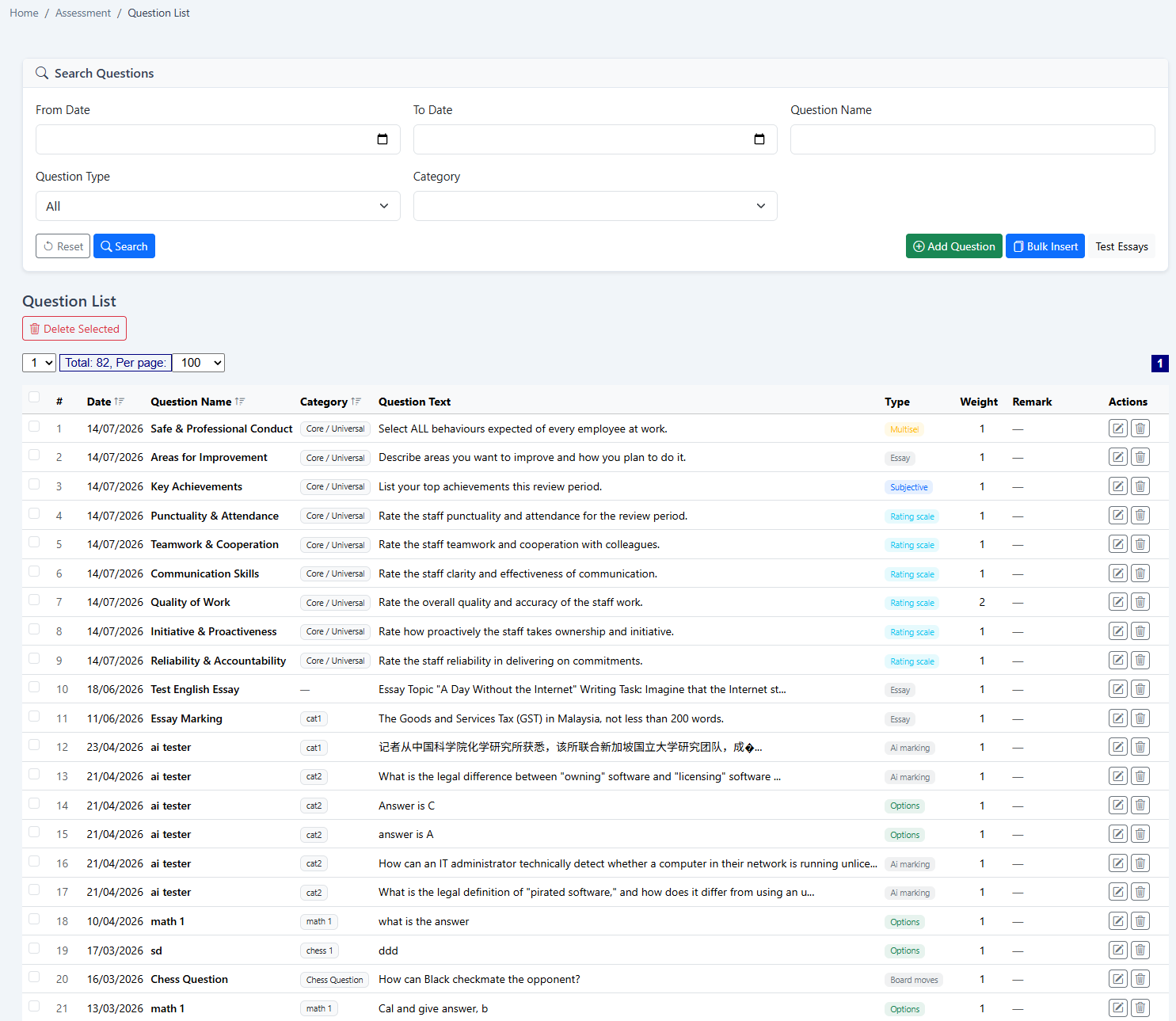
Navigate to: Menu > Assessment > Question List
Add questions manually or use Bulk Insert Questions
Upload via CSV for bulk import

3.3 Question Attributes:

  • Question text with rich formatting
  • Multiple-choice options (single or multiple answers)
  • Correct answer(s) identification
  • Detailed explanations for answers
  • Category tagging for easier retrieval
  • Difficulty level classification

Sample Question Bank Structure

Category Sub-Category Question Type Difficulty Sample Question
HR Policies Leave Management Multiple Choice Easy How many days of annual leave is an employee entitled to after 2 years of service?
Compliance LHDN Regulations Essay Medium Explain the monthly PCB submission process and deadlines.
Safety Workplace Safety Rating Scale Easy Rate your understanding of emergency evacuation procedures (1-5)

Knowledge Transfer & Training

Use assessment tools for effective knowledge transfer during staff turnover and ongoing development

Daily Assessment

Continuous learning through daily questions

  • Automated daily question assignments
  • Micro-learning approach
  • Knowledge retention reinforcement
  • Progress tracking over time

Training Questions

Structured training assessment

  • Pre and post-training assessments
  • Training effectiveness measurement
  • Skill gap identification
  • Training ROI analysis

Live Testing & Knowledge Transfer

Useful for:

Staff Training

Onboarding and continuous training

Knowledge Retention

During employee turnover

Skill Development

Ongoing professional development

Compliance Training

Regulatory and policy training

Implementation Steps:

  1. Create question bank with training materials
  2. Organize questions by department/role
  3. Set up daily or weekly assessment schedules
  4. Monitor participation and results
  5. Generate training effectiveness reports

Knowledge Transfer Workflow

Document Knowledge

Convert expertise into questions

Create Bank

Organize into categories

Schedule Training

Set assessment schedules

Employee Assessment

Complete assigned questions

Analyze Results

Identify knowledge gaps

Create Assessment Sets

4.1 Manual Creation

Go to: Menu > Assessment > Add Set
Define: Set Name & Course Name
Add Description/Instructions (HTML supported)
Set Completion Time limits
Configure Question Order options
Set Display Answer Mode
Configure Retry Options

4.2 Random Question Pick

Click New Set > Random Pick Questions
Select source category
Choose number of questions
System auto-generates the set
Pro Tip:

Use random question selection for unbiased testing and to prevent question memorization.

Employee e-Handbook

Digital handbook distribution made simple and eco-friendly

Paperless Handbook Distribution

Our e-Handbook feature allows employees to download the latest company handbook anytime, anywhere - eliminating printing costs and ensuring everyone has access to current policies and procedures.

Key Benefits:

  • Instant access to company policies
  • Eliminates printing and distribution costs
  • Easy version control and updates
  • Available 24/7 through employee portal
  • Audit trail of downloads
  • Secure document storage

e-Handbook Setup Process

Access Employee List

Navigate to Employee > Employee List and click Action > Upload File

Upload Handbook

Click Choose File, select your handbook file, and tick e-Handbook option

View Uploaded Files

Go to Employee > Action > File List to verify your upload

Employee Access

Employees can download the handbook from their File List

Quick Implementation

Average implementation time for e-Handbook feature: Less than 1 business day.

Business Impact

Visibility & Clarity

  • Clear job expectations reduce confusion
  • Timely feedback prevents small issues from becoming big problems
  • Performance trends become visible
  • Transparent evaluation process

Profitability

  • Identify most profitable projects/teams
  • Align training with business needs
  • Data-driven workforce decisions
  • Reduce employee turnover costs

Performance Improvement Statistics

30-50%

Improvement in employee performance

70%

Reduction in knowledge transfer time

60%

Faster new hire onboarding

40%

Reduction in compliance violations

Ready to Transform Your Employee Development?

Our HR specialists can help you implement an effective e-Learning and evaluation system tailored to your business needs. Organizations across Malaysia are seeing 30-50% improvement in employee performance with structured evaluations.