LHDN APPROVED PAYROLL SOLUTION

BizCloud Payroll Module

LHDN-approved Payroll Solution for Malaysian Businesses. Automates monthly tax deductions (MTD) using the Computerized Calculation Method. Fully compliant with Malaysian regulations including EPF, SOCSO, EIS, HRDF, and PCB.

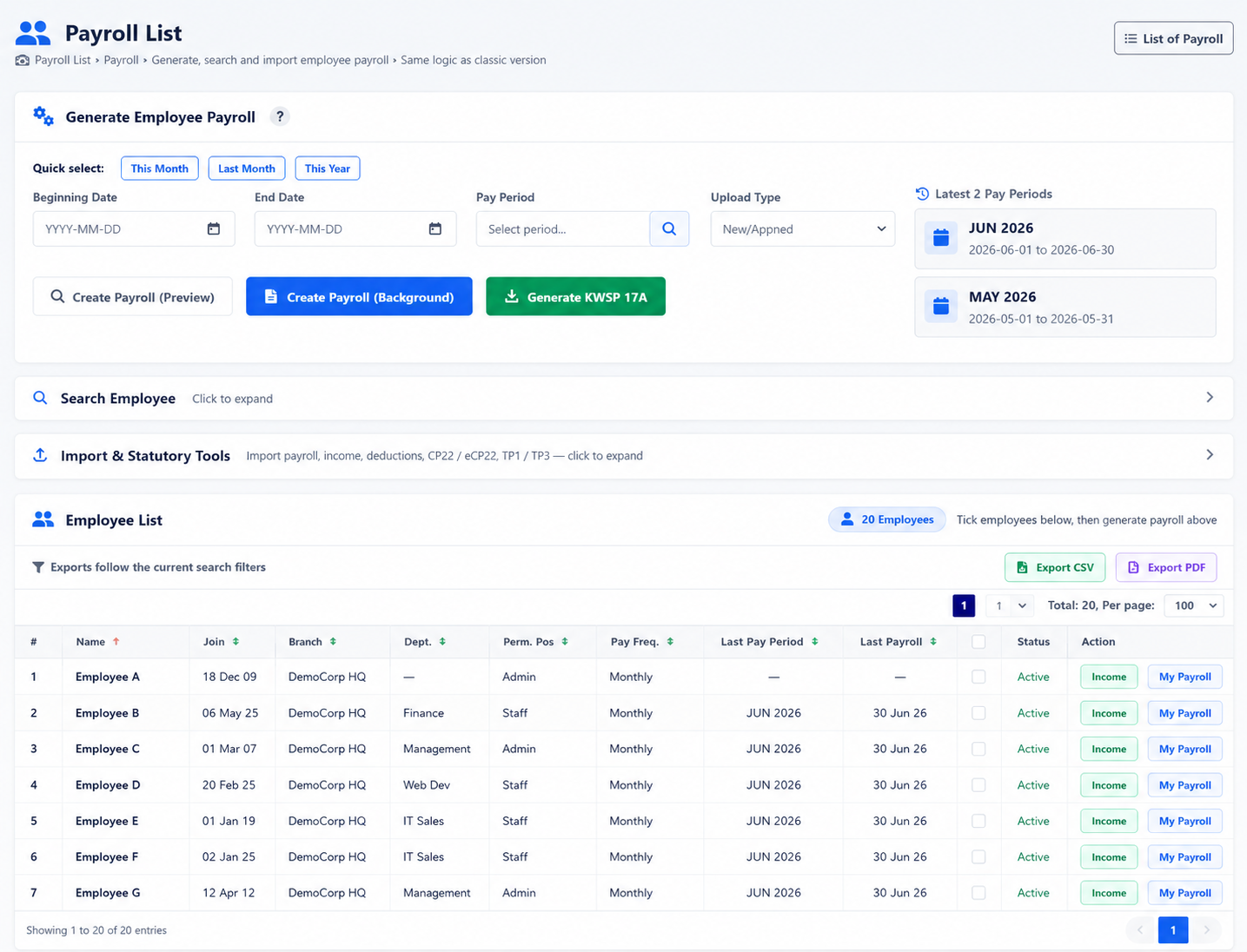
BizCloud Payroll Dashboard

Automated Payroll Computation

BizCloud HRM Payroll system enables authorized personnel to create accurate payroll computations compliant with Malaysian Labour Law, including proper calculation of unpaid leave deductions and statutory contributions.

LHDN Approved

Computerized Calculation Method for MTD compliance

Auto Calculations

Automatic EPF, SOCSO, EIS, PCB deductions

EA Form Generation

Automated year-end EA form creation

Leave Integration

Automatic leave balance calculations and deductions

Claim Processing

Claim processing directly in payroll

Real-time Updates

Regular statutory requirement updates

Statutory Compliance Features

Automatic Calculations

Our system automatically calculates all statutory contributions in compliance with Malaysian Labour Law:

KWSP (EPF) Perkeso (SOCSO) SIP/EIS Income Tax (PCB) LHDN MTD

Export & Payment

Easy submission process for all statutory requirements:

  • Export reports for record keeping
  • Online payment via respective portals
  • Direct salary payments from company account
  • Complete payment history tracking

Monthly PCB Submission

Submit deductions via CP39 to LHDN
Generate CP8D employer tax declaration
Ensure payment by 15th of following month
Generate TP1 (Monthly PCB record)
Generate TP3 (Adjustment form for bonuses or back pay)
Annual EA Form generation for income tax reporting
Implementation Timeline

Our payroll specialists can help you implement the system in just 1-3 weeks with full compliance to Malaysian statutory requirements.

Flexible Deployment Options

Standalone Payroll Module

Use just the payroll module without other HR components

  • Manual employee data entry
  • Excel template upload option
  • Reusable monthly templates
  • Basic payslip generation
  • Standalone operation

Integrated HR Suite

Full integration with other modules

  • Automatic attendance data inclusion
  • Leave balance calculations
  • Claim processing automation
  • Comprehensive reporting
  • Unified employee database

Payroll Processing

Setup

Define income & deductions

Data Sync

Attendance & leave integration

Calculation

Automatic statutory deductions

Generation

Generate payslips

Payment

Process payments & filings

4.1 Generate Payroll

Go to: Menu > Employee > Employee Payroll
Click New Payroll
Select: Date Range, Pay Period Name, Employees to include
Choose: New/Append or Edit/Overwrite
Click Create Payroll
4.2 Upload Payroll via CSV

Use the provided template to upload: Employee income and Deductions. Upload via Step 3: Import Income or Import Deduction on payroll page.

8.1 Integration & Automation

Payroll integrates with approved leave, claims, and attendance for auto-calculation:

  • Leave balance sync
  • Claim processing
  • Attendance tracking
  • OT calculations
  • Late deductions
  • Auto rounding rules
Auto Rounding & Calendar Days

Set at Admin > Company Info > HRM Tab: Enable EA rounding. Define payroll days: calendar or 26-day basis.

Payslip Management

Compliant with Malaysian Labour Law requirements

5.1 View & Print Payslips (Admin)

Go to: Menu > Payroll > Payroll List
Select employee
Click Print Pay Slip

5.2 Employee Access to Payslip

Employees go to: Menu > Payroll > Personal Payroll

View/download their monthly payslips through:

  • Web portal access
  • Mobile app viewing
  • Email distribution options
  • Bulk PDF generation

Payslip Elements

Employee Info
  • Employee name & payroll period
  • Socso, EPF, PCB tables
  • EIS/SIP tables
  • Custom remarks
Payroll Cycle
  • Start/end dates
  • Currency
  • Number of days in cycle
  • Basic salary & daily rate
Income & Deductions
  • Monthly salary & allowances
  • Claims & overtime payments
  • Leave deductions
  • KWSP, Perkeso, SIP/EIS, PCB
Re-calculate Function

If there are any alterations to the data, payroll personnel can click the Recalc button to re-calculate payroll for that employee based on the changes.

5.3 Customize Payslip Layout

Go to: Menu > HR > Payroll Setting > Payroll Setting

  • Modify company logo
  • Customize headers and footers
  • Adjust layout and formatting
  • Add custom fields
Need Help With Payslip Configuration?

Our payroll specialists can help you set up compliant payslips tailored to your company's requirements.

Income & Deduction Management

Income Types Configuration

Go to: Menu > HR > Payroll Setting > Income List
Add new income categories
Mark deductible options: EPF, SOCSO, EIS, HRDF, PCB
Supported Income Types:
  • Basic Salary
  • Allowances
  • Bonuses
  • Commissions
  • Daily wages
  • Overtime payments
  • Claims reimbursement
  • Special allowances

Deduction Types Configuration

Navigate to: Menu > HR > Payroll Setting > Tax/Deduction List
Add deduction categories
Configure rates and limits
Supported Deduction Types:
  • EPF contributions
  • SOCSO deductions
  • EIS/SIP payments
  • PCB income tax
  • Loan repayments
  • Late penalties
  • Advance salary recovery
  • Other statutory deductions

Reports & Advanced Features

7.1 Pay Period List

Navigate to: Menu > Payroll > Pay Period List

View payrolls by month or period with:

  • Status tracking
  • Total calculations
  • Export options

7.2 Payroll Summary

Go to: Menu > Payroll > Payroll List

Filter and export payroll records:

  • Department summaries
  • Individual reports
  • Custom date ranges

7.3 Salary History

View by individual via Employee > Employee Payroll

Complete historical data with:

  • Audit-ready documentation
  • Employee access to past payslips
  • Export options for reporting

Best Practices

  • Setup First: Set income and deductions before starting payroll generation
  • Monthly Audit: Use monthly audit checks to ensure accuracy
  • Backup Data: Always export payroll data for backup before changes
  • Employee Training: Train employees to access their own payslips
  • Timely Submission: Submit statutory payments by 15th of following month
  • Regular Updates: Stay updated with statutory requirement changes

Ready to Automate Your Payroll?

Our payroll specialists can help you implement the system in just 2-3 business days. Fully compliant with all Malaysian statutory requirements including LHDN, EPF, SOCSO, and EIS regulations.