AI-POWERED ATTENDANCE SYSTEM

BizCloud Attendance Module

Advanced employee time tracking with AI-powered facial recognition, GPS verification, and comprehensive attendance management. Streamline workforce management with our integrated time tracking solutions.

BizCloud Attendance Dashboard

Streamline Workforce Management

Accurate, real-time attendance tracking that eliminates time theft with cloud-based synchronization across multiple locations.

Configure Policies

Set up attendance policies and work patterns

Setup Methods

Configure clock-in methods for employees

Monitor & Report

Monitor attendance reports and analytics

System Access & Clock-In Methods

2.1 Web Portal Access

Navigate to your organization's BizCloud HRM login portal
Enter your username and password
From the dashboard, select: Menu > Employee > Attendance

Supported Clock-In Methods:

Facial Recognition Fingerprint QR Code GPS Mobile RFID Card

2.2 Mobile App Access

Download the BizCloud Mobile App (iOS/Android/Huawei)
Log in using your BizCloud HRM credentials
Tap the Attendance section from the main menu
Note

Mobile app features may vary slightly from the web portal. Ensure you're using the latest version of the app for the best experience.

GPS Clock-In Requirements

Important: Location must be enabled on the mobile device. GPS accuracy depends on device capabilities and signal strength.

A.I. Attendance System

Easily handles any work shifts with intelligent pattern recognition

Handles Any Work Shifts

  • Standard office hours (9am to 5pm)
  • Shifts between 0am to 12pm
  • Shifts spanning different days (10pm to 7am next day)
  • Scheduled work pattern changes

Auto Track Attendance

  • Auto indicates employee lateness
  • Auto indicates overtime hours
  • Automatically calculates recess time
  • Matches predefined workdays
  • Identifies employee absence

Seamless Integration

  • Integrates with e-Leave for absence reasons
  • Integrates with e-Claims for overtime detection
  • Automatic leave/holiday recognition
  • Centralized attendance data

AI Assistant Capabilities

Time Recognition
  • Recognize early and lateness attendance
  • Recognize overtime, late leaving
  • Recognize off-days
Pattern Recognition
  • Recognize shifts
  • Recognize work patterns
  • Schedule pattern changes
Benefits
  • Reduces paperwork by 70%
  • Eliminates human errors
  • Improves overall productivity
  • Customizable automation

Hardware Solutions for Every Business Need

Advanced workforce management devices with seamless integration

Facial Recognition

AI-powered facial recognition for contactless attendance tracking

Online & Offline 99.8% Accuracy

Fingerprint

Biometric fingerprint scanning with QR code verification

Dual Authentication 2,000 User Capacity

QR GPS

Mobile app-based check-in/out with location verification

Contactless Real-time GPS

Smart Phone App

Complete HR management via Android, iOS & Huawei devices

GPS Tracking Full Sync

System Comparison: QR-WFP vs QR-GPS

Properties QR Fingerprint Attendance System (QR-WFP) QR GPS Attendance System (QR-GPS)
Device 5" display with touch screen 3.5" TFT Resistive Touch Screen
Operation Mode Online & Offline Online
Employee Capacity Up to 3,000 Unlimited*
Identification Mode Fingerprint & QR Code QR Code & GPS
GPS Location Based No Yes
Software Software License BizCloud HRM Monthly Subscription
Connectivity WiFi WiFi & Cloud
Note: *Capacity subject to cloud storage limits. Both systems include free online support and exportable data.

Work Pattern Management

Streamline attendance tracking with intelligent work pattern configuration

What is a Work Pattern?

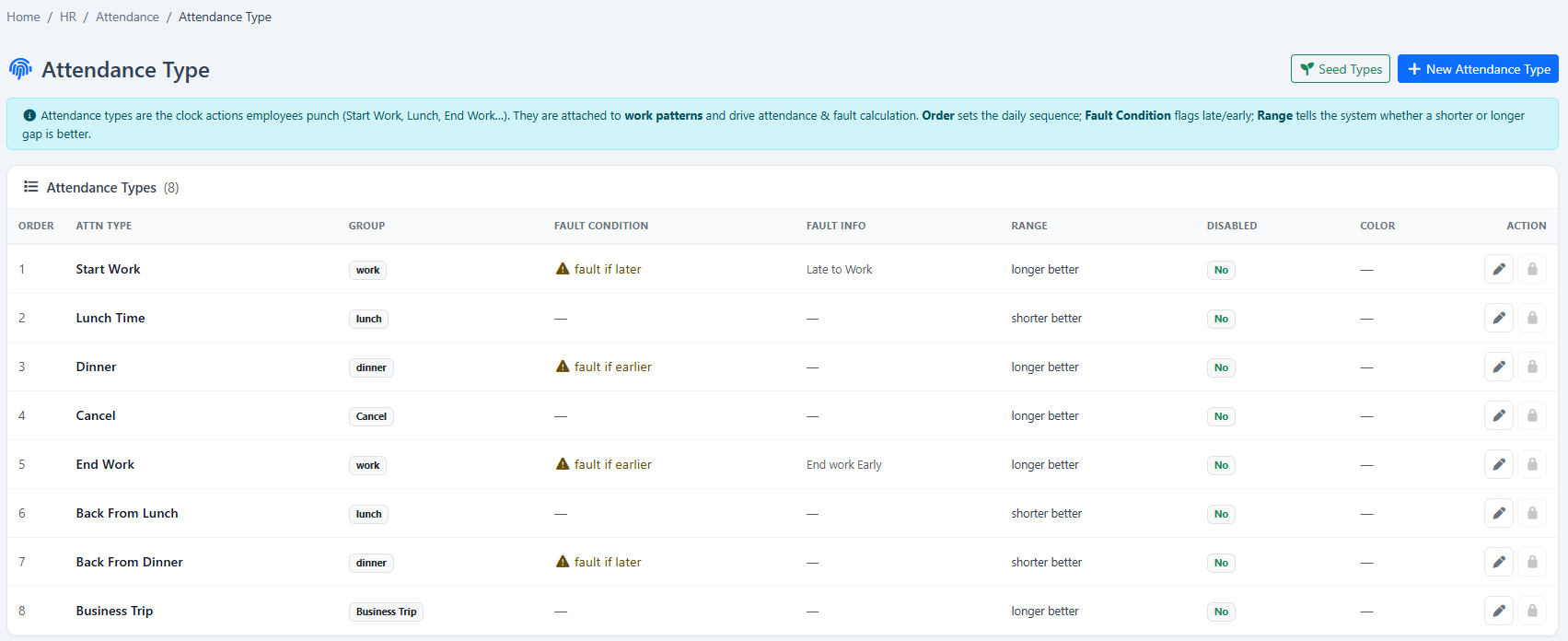
A work pattern defines an employee's expected working schedule, including standard working days, shifts, and break periods.

Standard working days
Work shift intervals
Break periods
Special arrangements
Alternate Saturdays
Night shift schedules

Flexible Pattern Options

Weekly patterns
Bi-weekly patterns
Tri-weekly patterns
Alternate day patterns
Monthly patterns
Custom rotating schedules

How It Works

The system automatically matches records and tracks compliance:

Matches clock-in/out records

Against defined work patterns

Identifies attendance exceptions

Late arrivals, early departures

Tracks break time compliance

Lunch, tea breaks monitoring

Calculates overtime

Based on end-of-day comparisons

Generates reports

Comprehensive summary reports

Example Work Pattern
08:30
Start work
12:30
Lunch out
13:30
Lunch in
17:30
End work

GPS Attendance with Photo Verification

Reliable remote attendance tracking for mobile workforces

Perfect for Remote Work

Our GPS Attendance System provides complete solution for tracking employees who work remotely, combining location verification with visual confirmation.

Key Benefits
Real-time GPS tracking

Accurate location verification

Photo verification

On-the-spot confirmation

Prevents buddy punching

Enhanced security

Cloud-based records

Access anywhere

Works worldwide

Global coverage

Geofencing

Location boundaries

How to Use

Open App

Launch attendance app

Take Photo

Capture on-the-spot photo

GPS Capture

Automatic location recording

Location Tracking Features
Click "Map" to trace location
Google Maps integration
Export attendance records
Cloud-based access

Geo-Fencing Attendance System

Control and monitor employee attendance locations with precision

Geo-Fencing Configuration

Navigate to: Menu > Employee > Employee Type
Edit the desired employee type
Enable Geo Fencing option
Set Allow Outside Geo Fencing to YES/NO
Create multiple geofenced areas
Drag to draw precise boundaries

Violation Handling & Alerts

Real-Time Alerts:
  • Instant supervisor notifications
  • Out-of-boundary warnings
  • Approval workflow for exceptions
  • Audit trail of all violations
Attendance Reports:
  • Real-time location tracking
  • Boundary violation flags
  • Time and location stamps
  • Exportable to Excel/PDF
System Requirements

Geo-Fencing works with both mobile data and WiFi location services. Requires Android 8.0+, iOS 12+ or HarmonyOS 2.0+.

Benefits & Integration

Reduce Human Error in Attendance Tracking

Challenge Typical Door Access BizCloud System
Time tracking Time-consuming to sort out employee time in/out Automatic clock in/out processing
Attendance monitoring Hard to recognize lateness and absent Automatic recognition of lateness, leaves, overtime
Payroll preparation Long consolidation before payroll calculation Instant data for payroll calculation
Accuracy Prone to human error Reduced human error by 99%

Centralized Attendance Data

  • Attendance data synced to the cloud automatically
  • Manage employee attendance list systematically
  • View all attendance data seamlessly across multiple branches
  • Compatible with multiple systems (BizCloud app, QRGPS, fingerprint, etc.)
  • All data consolidated into a single unified list
Integrated with e-Leave and e-Claim:
e-Leave Integration

Enhances attendance with leave information

e-Claim Integration

Completes the picture with claim data

All modules work together seamlessly in our cloud platform for a complete HR solution.

Towards a Touchless Attendance System

Verified Attendance in a Snap

From shared or personal devices, employees can clock in instantly with biometric verification. Just stand in front of the camera or use your smartphone's selfie camera for effortless time tracking.

Eliminate Buddy Punching and Time Theft

Our AI-driven facial recognition algorithm scans employee selfies when they clock in to alert you when photos don't match, preventing:

  • Buddy punching (colleagues clocking in for absent workers)
  • Time theft (getting paid for time not worked)
  • Unauthorized access
Automated Attendance Policies and Reports

Configure and automate your attendance policies:

  • Set late marks, half day, overtime rules
  • Define shift timings and work patterns
  • Generate real-time reports
  • Export detailed spreadsheets for payroll
99.8% Accuracy

Extremely low false positive rates

Hygienic

Touchless operation eliminates hygiene concerns

Attendance System Packages

QR-WFP Attendance System

RM1,499

This package includes:

  • 5" display with touch screen
  • Attendance Software
  • Online/Offline storage
  • Thumbprint & QR scan authentication
  • Secure data access

Optional: Cloud Subscription RM50/month (max 50 users)

URU Fingerprint System

RM659

This package includes:

  • URU Fingerprint Reader 4500
  • Attendance Software
  • PC-based installation
  • Cloud storage system
  • Unlimited employee storage*

Cloud Subscription: RM50/month (max 50 users)

*Terms and conditions apply

Cloud Software Only

From RM50/month

Standalone attendance module:

  • Mobile app attendance
  • GPS tracking & verification
  • AI pattern recognition
  • Work pattern management
  • Comprehensive reporting