Reduces administrative workload by 70%

BizCloud eLeave Module

Modern leave management for the digital workplace. Transform traditional leave management into a seamless digital experience.

BizCloud eLeave Dashboard

Streamline Your Leave Management

The e-Leave module in BizCloud HRM Suite is designed to simplify and automate the entire leave management process for your organization. This comprehensive solution handles everything from employee leave applications to multi-level approvals and balance tracking.

Streamlined Applications

Simple leave application process with mobile support

Multi-level Approvals

Flexible approval workflows with unlimited levels

Auto Calculations

Automated leave balance and entitlement calculations

Calendar Integration

Visual team calendar with color-coded leave status

Flexible Deployment Options

Standalone Solution

Implement just the leave management system you need today. Perfect for businesses focusing on digitalizing their leave processes first.

  • Complete leave management
  • Independent operation
  • Lower initial investment
  • Easy to implement

Full Suite Integration

Connect seamlessly with other HR modules as your needs grow. eLeave integrates perfectly with the complete BizCloud HR ecosystem.

  • Seamless data sharing
  • Automated leave deductions in payroll
  • Attendance integration
  • Unified employee database

System Access - Anywhere, Anytime

Web Portal Access

  1. Navigate to your organization's BizCloud HRM login portal
  2. Enter your username and password
  3. From the dashboard, select: Menu > e-Leave
Note: The web portal offers the complete feature set with full administrative capabilities.

Mobile App Access

  1. Download the BizCloud Mobile App (iOS/Android/Huawei)
  2. Log in using your BizCloud HRM credentials
  3. Tap the e-Leave section from the main menu
Note: Mobile app features may vary slightly from the web portal. Ensure you're using the latest version of the app.

Leave Application Process

3.1 Submitting a Leave Request

  1. Go to: Menu > e-Leave > Apply Leave
  2. Select your Leave Type (Annual, Sick, etc.)
  3. Choose the Date(s) and Time (Full day/Half day AM/Half day PM)
  4. Attach any required supporting documents
  5. Add optional remarks if needed
  6. Click Submit to send for approval
Important

Different leave types may have different submission requirements and deadlines. Configure these in your leave policy settings.

3.2 Special Conditions

Leave Type Example Requirements
Annual Leave Must be applied at least 4 days in advance
Medical Leave (MC) Requires medical certificate upload
Maternity Leave Requires HR approval and documentation
Multiple types Custom configurations available

3.3 Applying Leave for Others

  1. Go to: Menu > e-Leave > HR Apply Leave
  2. Select the employee from the list
  3. Complete the leave details as with a standard application
  4. Submit on behalf of the employee
Note: This feature requires special permissions typically granted to HR personnel and managers.

3.4 Company-Wide Leave Application

  1. Go to: Menu > HR > Leave Application > HR Apply Leave
  2. Select multiple employees or entire departments
  3. Apply leave collectively (e.g., for public holidays)
  4. Confirm the bulk application
Perfect for: Public holidays, company events, or department-wide activities.

Leave Approval Process

4.1 Multi-Level Workflow Configuration

  1. Navigate to: Menu > HR > Approval Setting > Approval Set
  2. Define your approval hierarchy and levels
  3. Set conditions using logical AND/OR combinations
  4. Save the approval workflow
The system supports unlimited approval levels to accommodate complex organizational structures.

4.2 Approval Methods

Email Approval

Approvers receive email notifications with direct action links

Mobile App

Use the BizCloud Mobile App's Pending Approvals section

Web Portal

Navigate to Menu > e-Leave > Leave Approval in web interface

Real-World Example

A manufacturing company uses conditional approvals where:

  • Department head approves all regular leaves
  • HR must additionally approve leaves during peak periods
  • Factory manager must approve any leave affecting production schedules

Our system supports these complex approval chains with easy configuration.

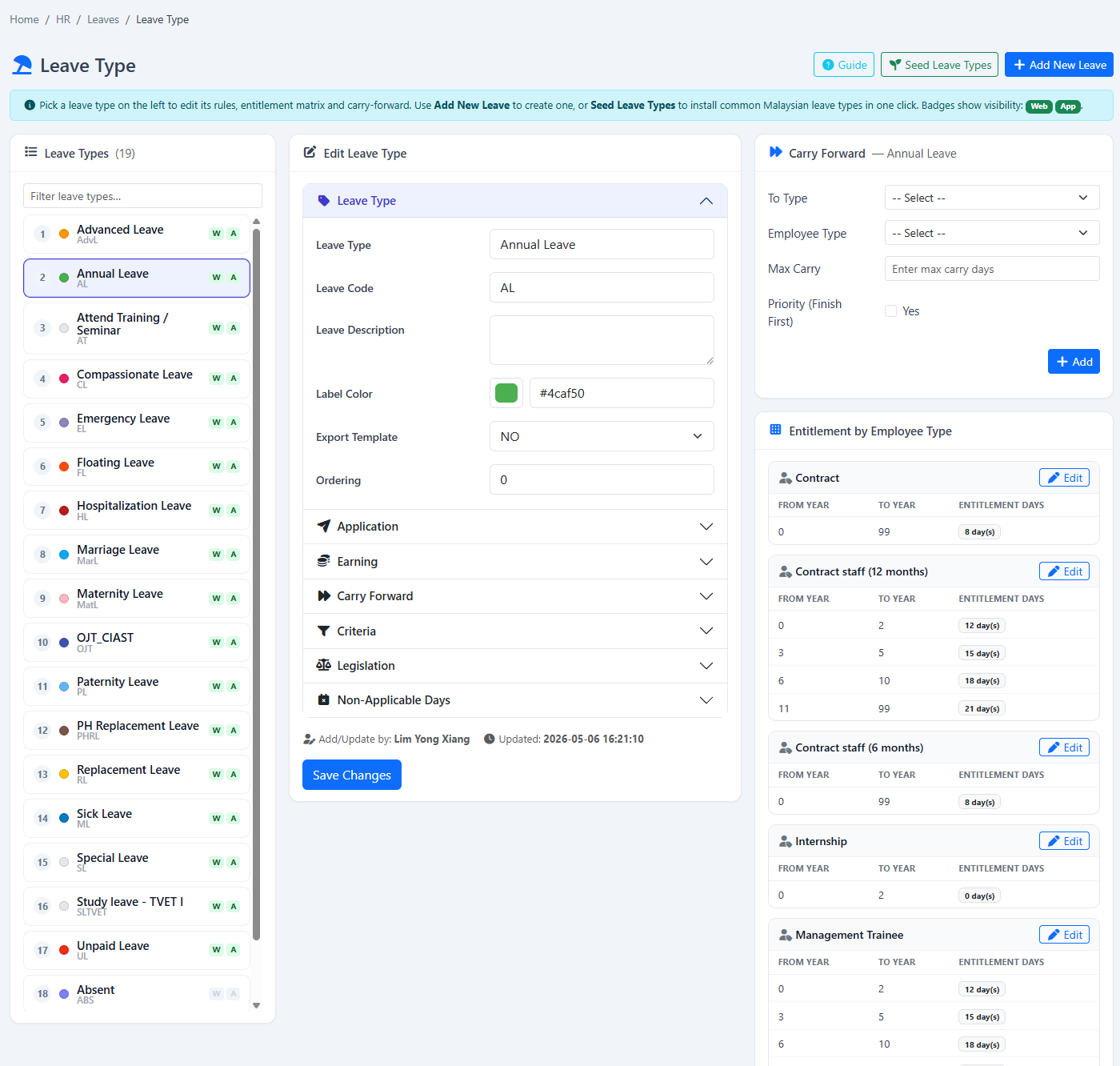
Comprehensive Leave Types

Configure unlimited leave types with custom rules and requirements

Standard Leaves

Common leave types

  • Annual Leave
  • Sick Leave
  • Maternity/Paternity Leave
  • Hospitalization Leave
  • Marriage Leave
  • Examination Leave

Special Leaves

Additional leave options

  • Unpaid Leave
  • Study Leave
  • Emergency Leave
  • Compassionate Leave
  • Blood Donation Leave
  • Reservist Leave

Advanced Configuration Options

Leave Carry Forward

Set maximum days that can be carried to next year

Advance Leave

Allow employees to take leave in advance

Leave Expiry Rules

Configure automatic expiry of unused leave

Probation Differences

Different leave entitlements during probation

eLeave Module Features

Multi-Platform Access

Apply leaves via mobile app (iOS/Android) or web portal. Self-service interface reduces HR workload.

Smart Automation

Auto-calculates leave balances in real-time. Automatic leave entitlement based on seniority/join date.

Document Management

Upload medical certificates/receipts. Digital storage for future reference with mandatory attachments for specific leave types.

Flexible Approval System

Multi-level approval workflows with email approval option for managers and delegation when approvers are on leave.

Calendar Management

Team calendar visibility with color-coded leave statuses and company events/holidays integration.

Real-time Notifications

Push notifications for status updates, email alerts for approvals, and reminders for unapplied leaves.

Continuous Evolution & Customer-Driven Development

What makes our eLeave system truly powerful is its adaptability:

  • Customer-Driven Development: We actively incorporate user feedback into regular system updates
  • Custom Rule Engine: Tailor leave policies to match your exact business requirements
  • Future-Ready Architecture: Our platform evolves to meet changing workforce needs
Our Promise

"We don't just sell software - we build solutions that grow with your organization. Our development team welcomes your unique requirements to create the perfect leave management system for your business."

Ready to Transform Your Leave Management?

Our HR specialists will guide you through setup and customization to match your exact business requirements.