Quick Navigation
Attendance System Overview
BizCloud HRM provides a comprehensive attendance management system with multiple verification methods, real-time tracking, and seamless integration with payroll and leave management systems.
Key Features:
- Multiple attendance methods (Fingerprint, GPS, QR Code, Facial Recognition)
- Real-time attendance tracking and monitoring
- Mobile app with GPS location tracking
- Automated overtime and late arrival calculations
- Seamless integration with payroll system
- Multi-branch and multi-location support
Supported Methods:
You can use multiple methods simultaneously for different employee groups or locations.
System Setup
1Hardware & Software Installation
- Download and install the fingerprint reader driver from manufacturer's website
- Install the latest version of BMO HRM System Software
- Connect the fingerprint reader to the attendance system computer
- Configure network settings for multi-device synchronization
• Fingerprint Driver: https://download.bmo.my/fingerprint-driver
• BMO HRM Software: https://download.bmo.my/hrm-latest
• Mobile App: App Store / Google Play
Ensure your computer meets minimum system requirements: Windows 10/11, 4GB RAM, 500MB free disk space.
2Employee Registration & Enrollment
- Launch and login to the BMO Attendance application
- Employee details will sync automatically from HR database
- Register fingerprints on the tablet (2 fingerprints per employee recommended)
- Take employee photo for facial recognition (if applicable)
- Assign access cards or QR codes (if using those methods)
Important: Uncheck magnetic and fingerprint scanner in settings for new enrollments to avoid conflicts.
For best results, clean fingerprint scanner regularly and ensure fingers are dry during enrollment.
3Mobile App Configuration
- Download BMO HRM mobile app from App Store or Google Play
- Enable location services for GPS attendance tracking
- Configure camera access for photo attendance
- Set up push notifications for attendance reminders
- Test attendance submission from mobile device
Mobile app supports attendance via GPS location, photo verification, and manual time entry with supervisor approval.
Attendance Configuration
Create and define rules for each attendance type:
- Go to Employee > Attendance > Attendance Type
- Set rules like "fault if later" for check-in (e.g., after 9:15 AM)
- Set rules like "fault if earlier" for check-out (e.g., before 5:45 PM)
- Configure grace periods (e.g., 15 minutes grace for late arrival)
- Define overtime calculation rules
- Save each attendance type configuration
You can create different attendance types for different shifts: Morning Shift, Night Shift, Part-time, Flexible Hours, etc.
Creating Shifts:
- Go to Employee > Attendance > Shift Management
- Create shift patterns (e.g., Regular 9-6, Shift A, Shift B)
- Define working days and hours
- Set break times and durations
- Configure shift rotations if applicable
Assigning Shifts:
- Assign shifts to individual employees
- Or assign to employee groups/departments
- Set effective dates for shift assignments
- Configure shift change notifications
You can create complex shift patterns including rotating shifts, split shifts, and compressed work weeks.
Configure holidays and integrate with e-Leave system:
- Go to HR > Holiday Setting
- Add public holidays (national, state, company-specific)
- Set recurring holidays annually
- Configure leave types that affect attendance
- Set up auto-deduction for unpaid leave
Attendance system automatically excludes approved leave days and public holidays from attendance calculations.
Attendance Methods
Employee
Selects method
Verification
Identity confirmed
Time Record
Timestamp captured
Sync
Data uploaded
Storage
Record stored
Fingerprint Attendance
Biometric verification for accurate time tracking
Setup Process:
- Connect fingerprint device to computer
- Install device drivers and software
- Register employee fingerprints (2-3 fingers)
- Configure attendance zones and policies
- Test attendance recording
Most secure method with 99.9% accuracy rate. Ideal for office environments.
GPS Mobile Attendance
Location-based attendance for field staff
Setup Process:
- Install BMO HRM mobile app
- Enable GPS/location services
- Define attendance geofences
- Configure photo verification (optional)
- Set up supervisor approval workflow
View employee locations on map with timestamp verification. Ideal for sales and field teams.
Facial Recognition
Contactless attendance with AI verification
Setup Process:
- Install facial recognition cameras/terminals
- Capture employee facial data
- Configure recognition sensitivity
- Set up temperature scanning (if available)
- Test with multiple lighting conditions
Hygienic contactless solution with optional temperature screening. COVID-safe attendance.
QR Code Attendance
Quick scan attendance for visitors/temporary staff
Setup Process:
- Generate unique QR codes for employees
- Install QR scanners at entry points
- Configure scanner software
- Set up mobile QR code display
- Test scanning speed and accuracy
Employees can display QR code on mobile app. Low-cost solution for small businesses.
Device Comparison
Multi-Branch Management
BizCloud HRM simplifies attendance management for companies with multiple locations (e.g., Penang, Malacca, Selangor, Johor).
Creating Employee Groups
- Create groups for each location (e.g., "Penang Office", "Malacca Factory")
- Assign employees to appropriate groups in their profiles
- Set group-specific attendance policies
- Configure group administrators and approvers
Location-Specific Settings
Configure different settings for each location:
- Different working hours and shifts
- Location-specific public holidays
- Different attendance methods per location
- Branch-specific overtime policies
All branch data syncs to central cloud database in real-time for consolidated reporting.
Holiday Leave Restrictions
Employees cannot apply for leave on their location's public holidays. The system displays: "You are not working on this day" if attempted. Different branches can have different holiday schedules.
Centralized Monitoring Dashboard
Head office can monitor all branches in real-time:
- Live attendance status across all locations
- Consolidated late arrival/early departure reports
- Branch comparison analytics
- Centralized approval for cross-branch transfers
Branch managers have localized control:
- View only their branch employees
- Approve overtime and attendance adjustments
- Generate branch-specific reports
- Manage branch holiday schedules
Reports & Analytics
1Attendance Summary Reports
Generate comprehensive attendance reports:
- Navigate to Employee > Attendance > Attendance Summary
- Select date range and employee/group filters
- View detailed attendance records including:
- Total working days and hours
- Late arrivals and early departures
- Overtime hours calculated
- Leave days and types
- Attendance percentage and score
- Export to Excel for further analysis
- Schedule automated report generation
Export Attendance List Report in PDF Format
Exporting Attendance List report:
- Navigate to Employee > Attendance > Attendance List
- Filter by date > Click on Search to get the records
- Click on Print button
- In print dialog, select destination as Save as PDF
- Choose location and click Save
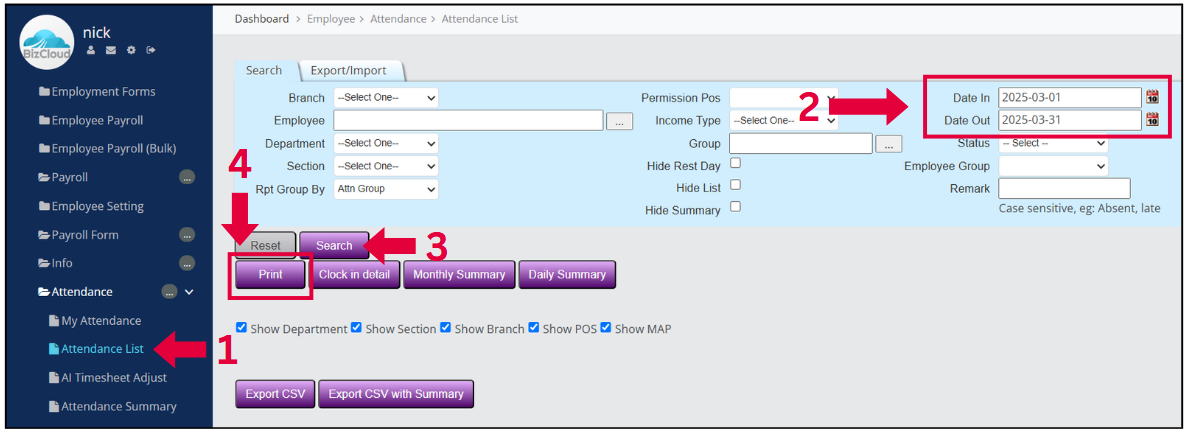
Step 1: Attendance List
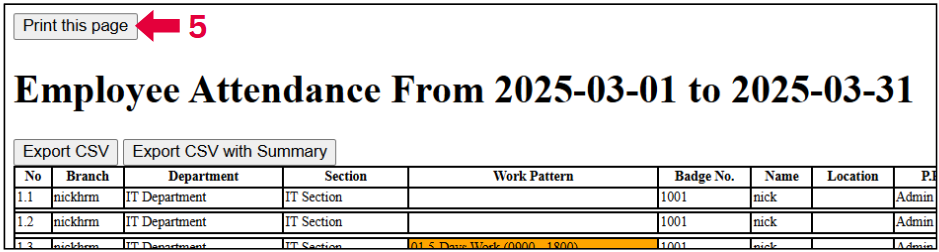
Step 2: Print Dialog
Punctuality Report
Track late arrivals, early departures, and absenteeism patterns by department or individual.
Overtime Report
Calculate overtime hours for payroll processing with approval status tracking.
Leave Balance Report
View remaining leave balances and taken leave days for each employee.
Location Attendance Report
For mobile/GPS attendance: View attendance locations on map with timestamps.
Trend Analysis
Monthly/quarterly attendance trends and comparisons across departments.
Compliance Report
Ensure compliance with labor laws and company policies.
Advanced Features
Map View with GPS Coordinates
When employees submit attendance via mobile app:
Admin Access
Admin logs in at login.bmo.my
Navigate to Attendance
Go to Attendance List
Search Records
Search by employee name and date
View Location
Click Map link to view GPS location on Google Maps
Verification
See GPS coordinates and street address for verification
This feature improves field staff accountability, verifies site visits, and saves operational time.
Modify Timesheet Records
Admins can adjust attendance records when needed:
Access System
Login at login.bmo.my
Find Records
Go to Attendance List and search for specific records
Edit Mode
Click Edit button to modify record
Make Changes
Adjust times, attendance types, or add/delete records
Save & Audit
Save changes - system maintains audit trail of all modifications
All edits are logged with username, timestamp, and reason for compliance and audit purposes.
Automated Alerts & Notifications
- Late Arrival Alerts: Notify supervisors when employees are late
- Absenteeism Alerts: Flag unusual absence patterns
- Overtime Approval: Automatic notifications for overtime requests
- Shift Change Alerts: Notify employees of schedule changes
- System Issues: Alert IT when attendance devices go offline
Notifications can be sent via email, SMS, or mobile app push notifications.
System Integrations
- Payroll Integration: Automatic overtime and attendance data for payroll
- e-Leave Integration: Seamless leave and attendance synchronization
- Access Control: Integrate with door access systems
- HR Analytics: Feed data to HR analytics dashboard
- API Access: REST API for custom integrations
Pre-built integrations with major payroll software and access control systems.
Best Practices
Implementation Best Practices
- Start with a pilot group before company-wide rollout
- Provide comprehensive training for all users
- Communicate clearly about new policies and procedures
- Have backup attendance methods during transition
- Regularly backup attendance data
For Employees
- Register multiple fingerprints for backup
- Keep mobile app updated for GPS attendance
- Report issues immediately to HR/IT
- Check attendance records regularly
- Submit corrections promptly when needed
For Administrators
- Regularly audit attendance records
- Clean and maintain hardware devices
- Update software and security patches
- Monitor for suspicious patterns
- Maintain clear documentation of policies
For Management
- Review attendance reports monthly
- Use data for workforce planning
- Identify training needs from patterns
- Benchmark against industry standards
- Continuously improve attendance policies
Maintenance Schedule
Daily:
- Check system synchronization status
- Review error logs and alerts
- Verify backup completion
Monthly:
- Clean fingerprint scanners
- Update employee records
- Review and purge old data
- Test backup restoration