Less manual calculation
Use configured BizCloud rules, records and visibility to make this outcome repeatable across the organisation.
BizCloud matches attendance records to work patterns, applies attendance-type rules and prepares management information without requiring HR to calculate every record manually.
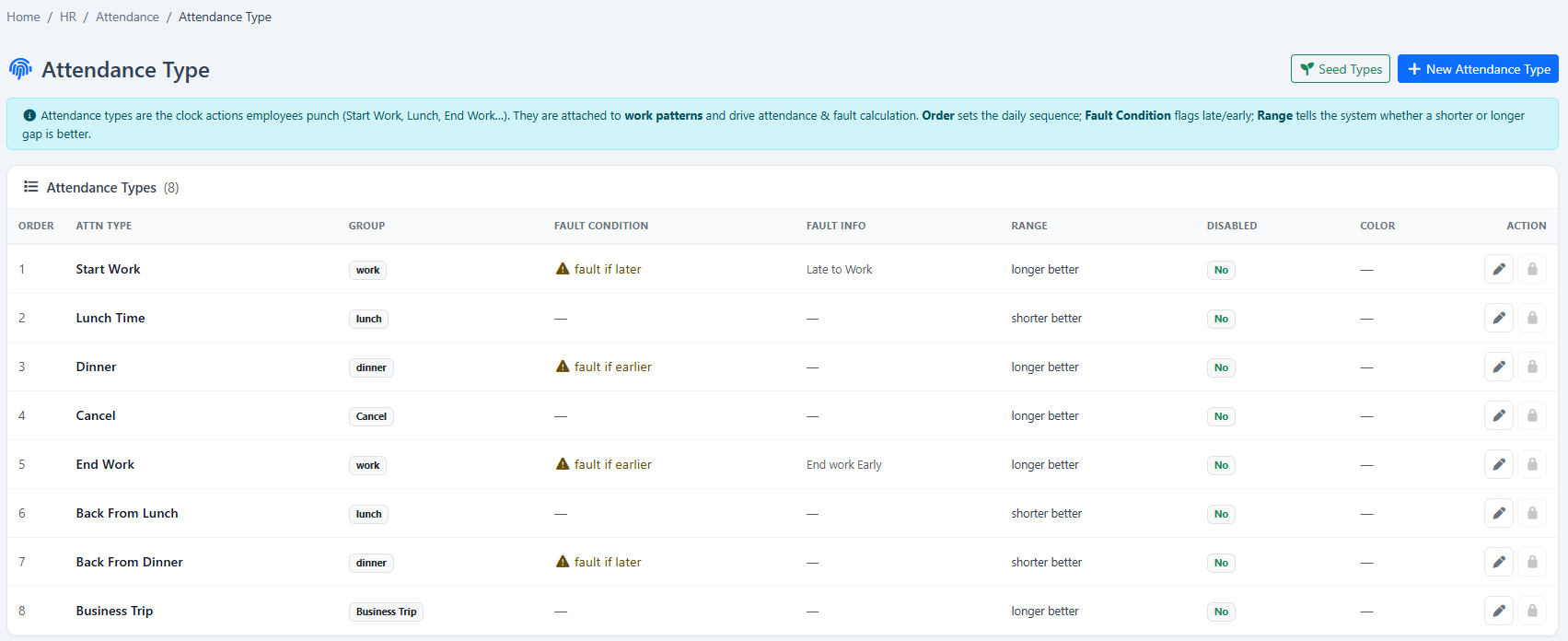
Calculate attendance daily, classify late or early events and send scheduled reports to administrators.
Use configured BizCloud rules, records and visibility to make this outcome repeatable across the organisation.
Use configured BizCloud rules, records and visibility to make this outcome repeatable across the organisation.
Use configured BizCloud rules, records and visibility to make this outcome repeatable across the organisation.
These functions come directly from the current BizCloud system and the supplied module information.
Discuss this capabilityDefine attendance types for late arrival, early departure and other exceptions.
Calculate lateness around work, lunch, dinner and company-defined groups.
Run daily automated attendance pre-computation.
Match employee records to the appropriate work pattern.
Review the calculated attendance list with work pattern, location, time in and out, map links, hours, group, leave and exception remarks.
Send attendance reports to administrators on a schedule.
Let employees review their attendance and work days online.
Enter or adjust authorised attendance date and time details manually.
BizCloud combines setup rules, employee or manager actions, automated processing and controlled follow-up.
Collect clocking information from the selected device or mobile method.
Identify the schedule and time groups that apply to the employee.
Classify late, early, overtime, missing clocking, rest day, holiday and other attendance results consistently.
Review the calculated attendance list, send scheduled information and allow authorised correction when necessary.
Each screenshot corresponds directly to this workflow and can be enlarged for a closer look.