Consistent claim policy
Use configured BizCloud rules, records and visibility to make this outcome repeatable across the organisation.
BizCloud controls which claim types are available, how they link to payroll and what limits apply to each employee type before a claim reaches approval.
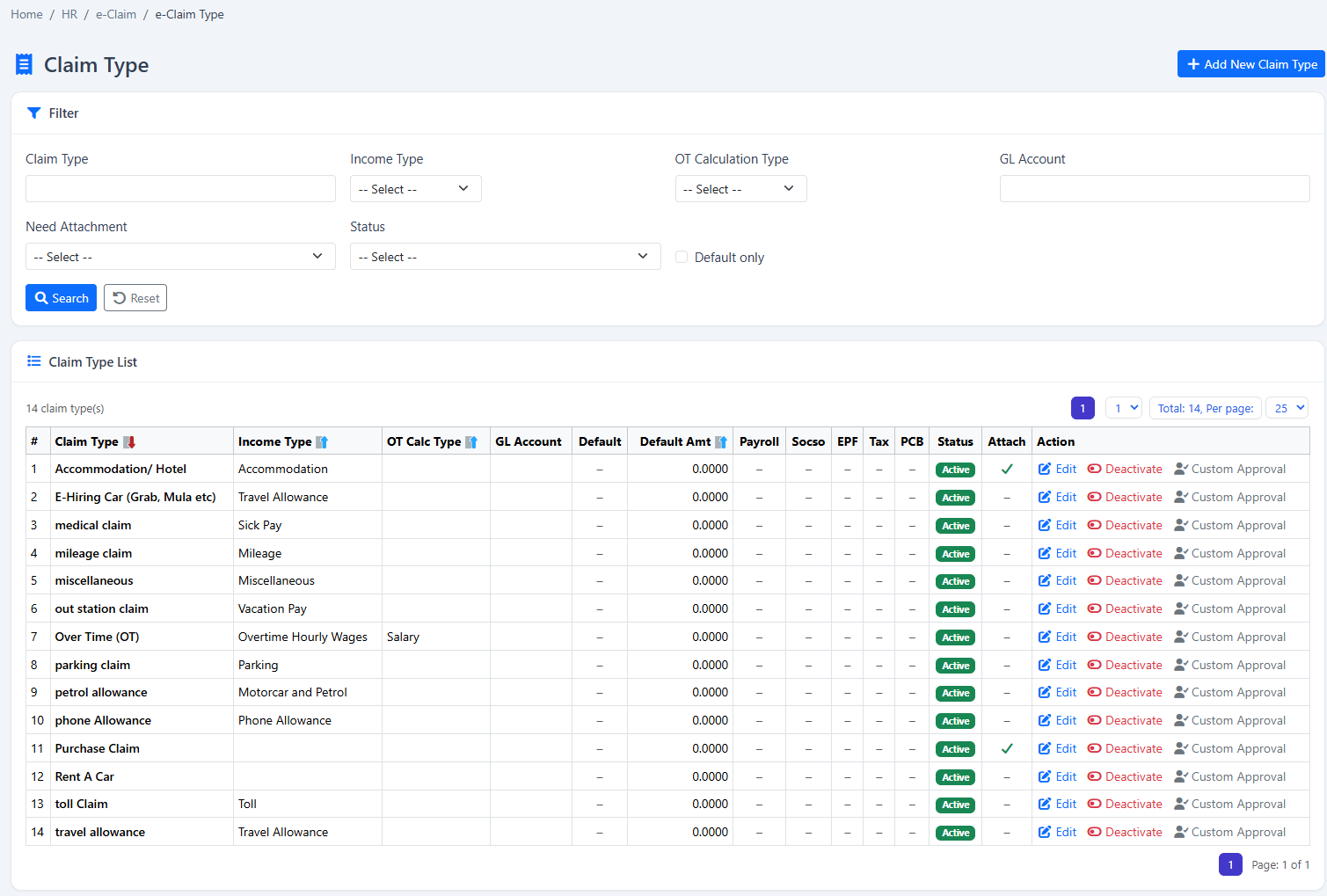
Create regular and overtime claim types, connect them to payroll income and apply limits by employee type.
Use configured BizCloud rules, records and visibility to make this outcome repeatable across the organisation.
Use configured BizCloud rules, records and visibility to make this outcome repeatable across the organisation.
Use configured BizCloud rules, records and visibility to make this outcome repeatable across the organisation.
These functions come directly from the current BizCloud system and the supplied module information.
Discuss this capabilityCreate claim types for different expense categories.
Link a claim type to payroll income where reimbursement requires it.
Set the maximum claim amount by employee type.
Submit a regular expense claim.
Submit a separate hour-based overtime claim.
Submit claims from the BizCloud app.
Keep claim rules aligned with employee policy context.
BizCloud combines setup rules, employee or manager actions, automated processing and controlled follow-up.
Set categories, behaviour and payroll connection.
Control the limit available to each policy group.
Choose regular or overtime claim from web or mobile.
Use configured type and cap information before approval.
Each screenshot corresponds directly to this workflow and can be enlarged for a closer look.