Eight flexible step types
Use configured BizCloud rules, records and visibility to make this outcome repeatable across the organisation.
Upload a document or build a guided SOP, add translations, then publish and assign it using your existing BMO employees and departments.
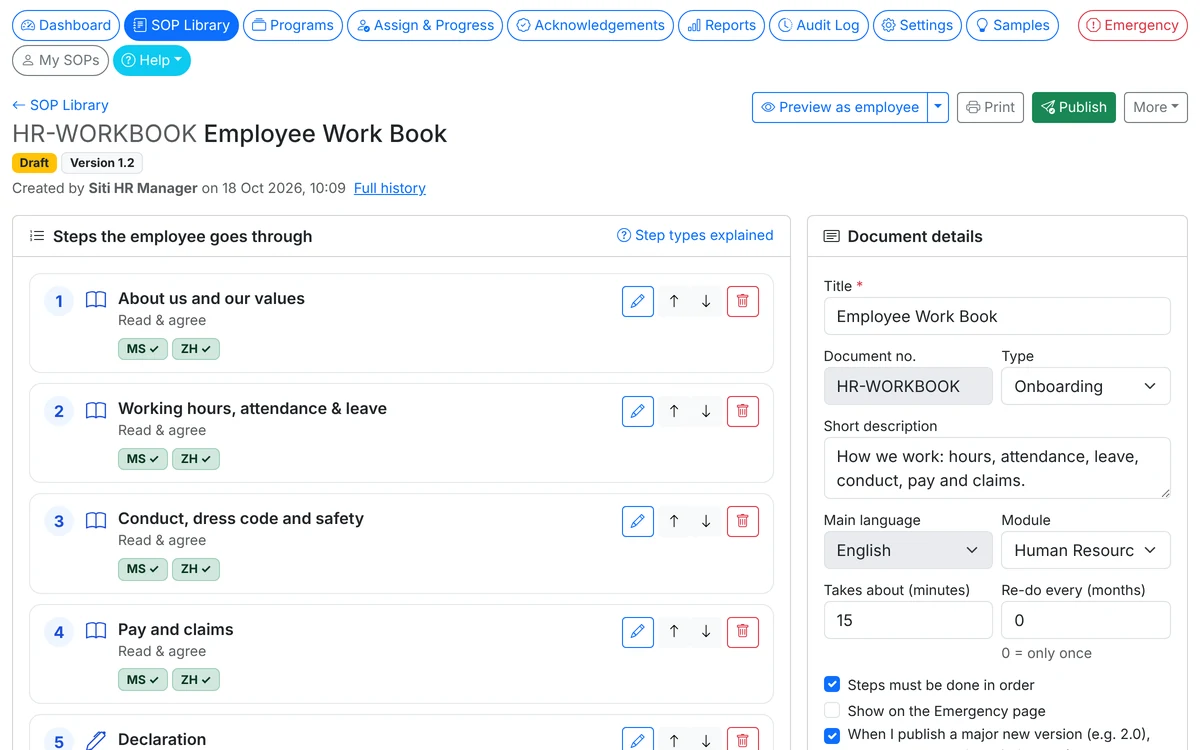
Turn existing policies into signable SOPs, combine eight step types and bundle procedures into onboarding programs.
Use configured BizCloud rules, records and visibility to make this outcome repeatable across the organisation.
Use configured BizCloud rules, records and visibility to make this outcome repeatable across the organisation.
Use configured BizCloud rules, records and visibility to make this outcome repeatable across the organisation.
These functions come directly from the current BizCloud system and the supplied module information.
Discuss this capabilityUpload PDF, Word, Excel or image files up to 20 MB.
Combine Read & agree, Sign, Checklist, Quiz, Video, Upload a file, Form and Information steps.
Set a quiz pass mark and allow retries; add photo evidence to checklists when needed.
Embed YouTube or Vimeo videos, or upload MP4 or WebM files up to 100 MB.
Add English, Bahasa Melayu and Chinese translations for employees to choose.
Bundle SOPs into programs, auto-assign to new joiners and schedule re-acknowledgement every N months.
BizCloud combines setup rules, employee or manager actions, automated processing and controlled follow-up.
Upload an existing document or build the SOP one step at a time.
Prepare the languages your employees need.
Lock the content as a version before assigning it.
Choose staff or departments, set due dates and track completion.
Each screenshot corresponds directly to this workflow and can be enlarged for a closer look.